



















Marketo Data Extractor: The Hidden Power Move for Smarter B2B Marketing Ops
If you’re still manually pulling lead and activity data from Marketo, you’re not just wasting time—you’re leaving insights (and revenue) on the table.
In this guide, we’ll unpack the Marketo Data Extractor, a powerful but often underutilised feature that enables bulk data exports for advanced reporting, analytics, and integration. Whether you’re a demand generation leader, RevOps strategist, or marketing operations manager, understanding how to use this tool effectively can transform how your team works with data.
Quick answer:
The Marketo Data Extractor uses REST APIs to export large volumes of lead, activity, and custom object data in CSV format, enabling scalable reporting and seamless integration with BI tools.
Read on to learn how it works, why it matters, and how JTF helps B2B marketers turn data into revenue.
What Is the Marketo Data Extractor?
The Marketo Data Extractor refers to a set of bulk extract APIs within Marketo Engage that allow users to export large datasets for external analysis and reporting. It’s designed for high-volume use cases where traditional UI exports or individual API calls fall short.
Overview of Bulk Extract APIs
- REST-based interface for exporting data
- Supports leads, activities, program members, and custom objects
- Returns data in CSV format for easy ingestion
How It Works
The process follows a four-step flow:
- Create a job: Define the object type, fields, filters, and format.
- Enqueue the job: Submit it to the job queue.
- Poll for status: Monitor job progress until completion.
- Download the file: Retrieve the exported data via HTTP.
Key Limits and Considerations
- Maximum of 2 concurrent jobs and 10 queued jobs
- Daily export quota of 500MB (can be increased)
- Not workspace-aware—exports data across all workspaces
Why Use Marketo Data Extractor?
For B2B marketers working in complex environments, the Marketo Data Extractor offers a scalable way to operationalise data. Here’s how it supports key functions across marketing and revenue teams.
Automate Reporting Workflows
Manual exports are error-prone and time-consuming. Automating data extraction ensures consistency and frees up your team to focus on analysis, not admin.
Sync with BI Tools
Exported data can be ingested into platforms like Power BI, Tableau, or Domo to build real-time dashboards that track campaign performance, lead velocity, and pipeline contribution.
Improve Lead Attribution
Extracting activity logs allows you to map touchpoints across the buyer journey, enabling multi-touch attribution and better ROI analysis.
Enable Data Hygiene Audits
Bulk data exports make it easier to identify outdated, incomplete, or inconsistent field values—critical for maintaining CRM integrity and segmentation accuracy.
Support RevOps Alignment
By sharing consistent data across marketing, sales, and finance systems, you create a unified view of the funnel and improve cross-functional decision-making.
How to Set Up a Marketo Data Extractor Job
Getting started with bulk data extraction requires some technical setup, but the process is straightforward once you understand the flow.
Authentication & Permissions
- Uses OAuth 2.0 Bearer token for secure access
- Requires an API user with appropriate permissions
Creating a Job
- Specify object type (e.g., leads, activities)
- Define fields and filters
- Choose CSV format for output
Enqueue and Monitor
- Submit the job to the queue
- Poll the job status endpoint until completion
Download and Verify
Use SHA-256 checksum to verify file integrity
Retrieve the file via HTTP

Outline of best practices
Webinar on Demand: Managing your Marketo Engage database hygiene
In our on-demand webinar, Managing Your Marketo Engage Database Hygiene, we show you how to streamline your data hygiene workflows.
What you will learn:
- Why poor quality data prevents you from seeing your marketing successes
- How dirty data in your database bloats your Marketo licence fee
- Examples of Marketo Engage rules to remove unnecessary data from your database
- Using data hygiene reporting to monitor database health
- How to clean up duplicated data quickly and easily
Common Challenges and How to Avoid Them
While powerful, the Marketo Data Extractor has limitations that marketers should plan around.
Daily Quota Limits
The default quota is 500MB per day across all object types. If you hit this limit, consider batching exports or requesting an increase from Adobe.
Workspace Limitations
Bulk extract jobs are not workspace-aware, meaning they pull data across all workspaces. Use post-export filters to segment data as needed.
API Errors and Job Failures
Common error codes include:
- 1029: Job already exists
- 1035: Quota exceeded Implement retry logic and monitor job status to handle failures gracefully.
Marketo Data Loader: Streamline Your Data Imports with Confidence
While extracting data from Marketo is essential for reporting and analytics, importing clean, structured data into Marketo is equally critical for campaign execution, segmentation, and lead management. That’s where the Marketo Data Loader comes in.
Designed specifically for Marketo Engage, the Data Loader enables secure, automated, and scalable data imports—far beyond what generic ETL tools can offer. Whether you’re syncing CRM records, uploading event lists, or aligning custom fields, the Data Loader ensures your data lands in Marketo accurately and reliably.
Key Capabilities
- Data Schema Discovery and Mapping
Automatically align incoming data with Marketo’s field structure to prevent mismatches and errors. - Encryption and Secure Transfers
Enterprise-grade encryption protocols ensure compliance and data protection throughout the import process. - Automated Scheduling
Set flexible transfer windows to eliminate manual uploads and reduce operational overhead. - ETL Processing
Extract, clean, and load data seamlessly—whether from Salesforce, a data warehouse, or a CSV file. - Error Logging and Notifications
Built-in alerts and logs help you catch and resolve issues before they impact campaigns. - Rapid Setup
JTF’s implementation takes less than 24 hours, with minimal disruption to your existing workflows.
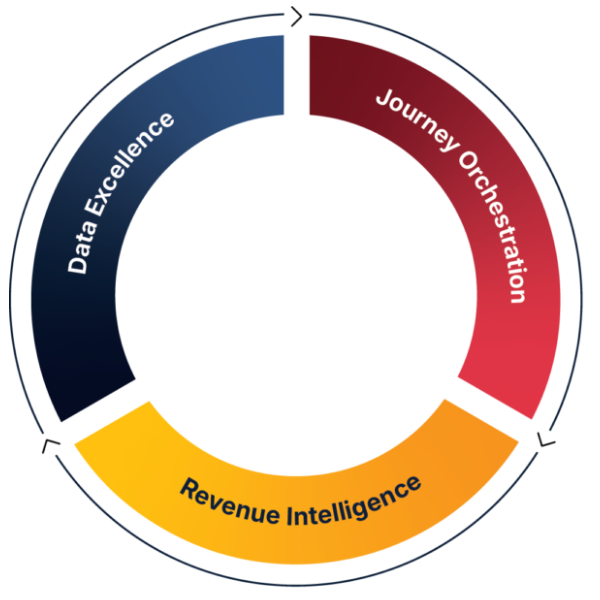
JTF Revenue Acceleration Loop
How can JTF help with your Marketo Data?
JTF isn’t just another Adobe consultancy—we’re specialists in operationalising marketing technology to accelerate revenue. Our approach connects data extraction and loading to strategic outcomes through our proprietary Revenue Acceleration Loop.
- Experts in Adobe Marketo Engage: Deep platform knowledge and hands-on experience
- Strategic Integration Support: From CRM sync to BI dashboards, we help you make data flow where it matters—without compromising accuracy or scalability
- Revenue Acceleration Loop: A proven methodology for aligning marketing with revenue outcomes
→ Explore the Revenue Acceleration Loop - End-to-End Support: Our framework ensures that data extraction isn’t just a technical task—it’s part of a repeatable process that drives pipeline growth and marketing efficiency.
Conclusion
The Marketo Data Extractor is more than a technical feature—it’s a strategic enabler for B2B marketing teams that want to move faster, report smarter, and align better with revenue goals. By automating data workflows and integrating with your analytics stack, you unlock deeper insights and tighter cross-functional collaboration.
JTF helps you go beyond extraction. We embed it into your Revenue Acceleration Loop, ensuring that every data point contributes to pipeline growth and marketing performance.
Ready to operationalise your data strategy?
Frequently Asked Questions
It exports large volumes of lead, activity, and custom object data for reporting, analytics, and integration with external platforms.
No. Bulk extract jobs pull data across all workspaces. You’ll need to filter the data after export.
The default quota is 500MB per day, shared across all object types. You can request an increase from Adobe if needed.
Yes. You can extract custom object data using the appropriate bulk extract endpoints.
Yes. The file endpoint supports byte-range retrieval, allowing you to resume partial downloads.
SPEAK TO SOMEONE WHO ACTUALLY GETS IT.
Need help?
No fluffy sales pitch. No pressure. Just straight-talking marketing technologists who live and breathe Adobe. Whether you’re planning a rollout or fixing what’s not working, we’re here to help you get the most from your stack. So go on, don’t be shy!
You’ll talk to a consultant, not a salesperson.